How I Chose PDF Max’s Architecture: Why the Viewer Uses HTML Canvas
Why PDF Max moved from two native viewers to a shared HTML canvas engine inside a native shell—and how LOD, tiling, and caching keep interaction fluid.
Direct answer
Why does PDF Max use an HTML canvas PDF viewer inside a native app?
PDF Max uses a shared HTML canvas viewer because a solo founder can evolve one interaction and document UI across platforms while the native app renders PDF tiles. The canvas viewer lays out those tiles, moves retained surfaces during gestures, shows a low-detail page immediately, prioritizes visible 1024-pixel tiles, and replaces them atomically with sharp detail.
When I worked at Xero, I spent a lot of time in Figma and Miro—probably enough to qualify as a minor residency. Figma files held hundreds of UI screens, component states, and interaction paths: whole sections of the product mapped across one canvas. They were huge.
What surprised me was that files of that scale could still feel direct in a browser. Grab the surface, move it, zoom into a screen, and the pixels followed your hand instead of arriving with an apology. A designer could reproduce a real application screen with pixel-level precision; Miro could make an enormous board feel like one continuous space. The idea that stayed with me was simple: native feel is a property of the whole interaction pipeline, not the programming language used for every layer.
The original PDF Max was native twice
The original PDF Max applications were fully native and separate. On iOS, the viewer was built around Apple's Core Graphics PDF APIs. On Android, it used a commercial PDF rendering SDK. Each platform had its own rendering integration, gesture behavior, view hierarchy, caches, and fixes.
That made sense when the apps were young. Native frameworks offered a dependable path from PDF to pixels and platform-appropriate UI. A gesture or memory problem on iOS could be solved in the iOS viewer; Android could be solved again. Same product, same founder, two codebases, and twice as many ways to lose a weekend.
A PDF viewer also owns selection, search, links, annotations, forms, editing handles, page organization, zoom anchoring, keyboard behavior, and accessibility. Two native viewers meant two evolving interpretations of the product. Every substantial interaction had to be designed, tuned, and tested twice.
For a larger team, that can be reasonable. I did not have an iOS viewer team and an Android viewer team. Both teams were me. The expensive part was preserving equivalent behavior through hundreds of later changes.
The real decision was where to share complexity
I considered two broad architectures for the rebuilt viewer.
| Architecture | What it gives you | What it costs |
|---|---|---|
| Separate native viewers | Maximum direct use of each platform and familiar native debugging | Every interaction, rendering policy, and bug fix can diverge across platforms |
| Native shell with a shared canvas viewer | One interaction model plus native files, windows, menus, sharing, and native tile rendering | A real bridge boundary, two memory domains, and more careful coordination between pixels and UI state |
I chose the shared-viewer option. Not because it was the simplest—it absolutely was not—but because it let me pay for the most complicated product behavior once.
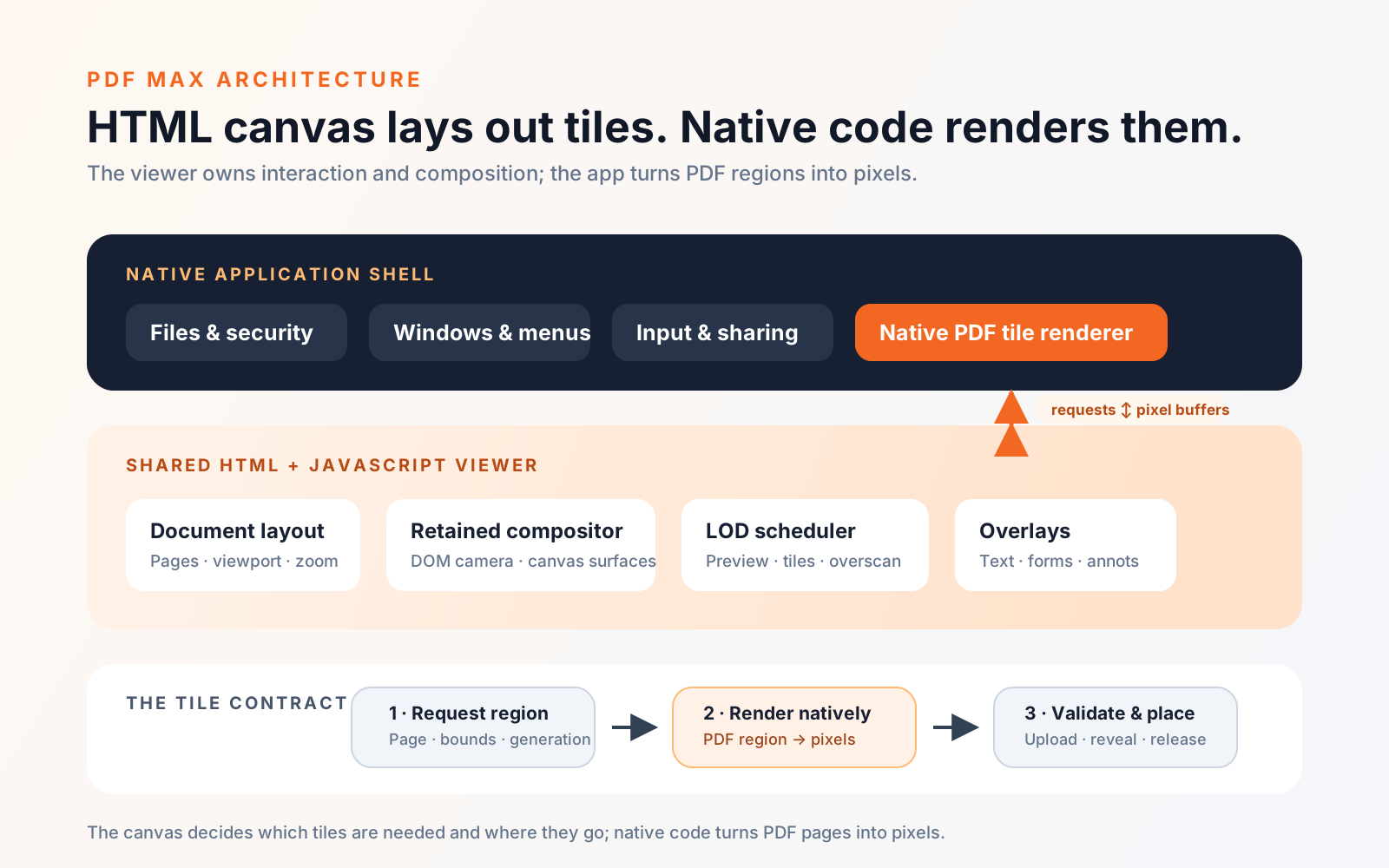
PDF Max now treats the native application as a shell in the architectural sense, not as a web page wearing a native trench coat. The shell owns the document lifecycle and operating-system services: secure files, windows, menus, sharing, platform input, and purchases. A WebKit view hosts the shared PDF interaction engine.
That engine lays out pages, tracks the viewport, interprets pan and zoom, positions selections and annotations, and chooses which raster detail to produce next. Its behavior can travel to another native host without rebuilding the document experience.
“HTML canvas viewer” does not mean one giant canvas
PDF Max uses HTML canvas to present page pixels and overlays, but not one enormous bitmap redrawn for every finger movement. That would be wonderfully simple right up until it caught fire.
There are several cooperating layers:
- A document layout model knows where pages live in the scrollable space.
- A retained compositor keeps useful page and tile canvases alive instead of decoding and uploading the same pixels again for every frame.
- A DOM camera moves that retained scene with a parent transform during active gestures.
- A lower-detail page surface provides immediate coverage when exact detail is missing.
- Sharp raster tiles replace that preview where the reader can actually see them.
- Text, links, selections, annotations, form controls, and editing affordances sit in their own layers and invalidate for different reasons.
This is closer to a small scene renderer than a traditional web document. Panning and rendering are different jobs: moving the camera should not wait for PDF decoding, and a new tile should not reconstruct every overlay. Each visual responsibility can be scheduled by urgency.
Level of detail protects continuity
The hardest performance target is not “render the sharpest possible page.” It is “never lose the document while the user is moving it.” A perfectly sharp frame that arrives after a blank one still feels broken. Readers are surprisingly unsympathetic to technically correct blank rectangles.
PDF Max therefore treats raster detail as a level-of-detail, or LOD, problem.
At the start of a pan or pinch, the compositor moves retained surfaces immediately. If the exact zoom level is not ready, it stretches the best available page preview or previous tile generation. That image may be temporarily softer, but the page remains visually attached to the gesture.
Behind that motion, the viewer calculates the visible page rectangle and divides the full-resolution target into 1024 × 1024 cells. Those are output-bitmap pixels, not CSS pixels: one RGBA cell is about 4 MiB before browser and GPU overhead. Visible cells are requested before off-screen work and sorted by distance from the viewport center. Once that cohort is covered, the scheduler can prefetch into an overscan window. During fast movement, the window projects farther in the direction of travel instead of spending equal work behind the camera.
The current shared profile, including Android, can combine nearby cells into 2×2 requests to amortize bridge overhead. An enabled desktop profile can use 3×3 batches—36 MiB of raw RGBA in one result. Apple mobile deliberately caps a batch at a 2×1 horizontal strip, or about 8 MiB raw, to reduce WebKit memory pressure. These are starting policies rather than claims that every device behaves alike. The best batch size is a renderer, transport, decoder, canvas, and memory question.
A frame budget is a product rule
The renderer can be ambitious; it cannot be rude. The scheduler gives synchronous JavaScript tile painting and scheduling roughly 12 milliseconds normally and 4 milliseconds during active panning, checking the clock between tiles. This excludes asynchronous native PDF raster time across the bridge. The values are implementation settings, not frame-time promises; they make the main thread yield to input and presentation.
At least one useful tile progresses before an exhausted budget yields to another animation-frame pass. Many missing tiles therefore cannot turn one repaint into a long synchronous stall.
The system also distinguishes touch dragging from pointer scrolling. With a mouse or trackpad, it can sometimes suppress more raster work during rapid movement and catch up after the camera settles. With direct touch, deferring everything can expose a blank row under the finger as soon as the page crosses an edge. The same optimization policy does not produce the same perceived result for every input mode.
Sharp detail has to arrive as a coherent result
An early tile cache solved one problem and created another. Tiles appeared as soon as they finished, which meant a soft page could sharpen as a visible checkerboard. Technically, the viewer was improving every few milliseconds. Visually, it looked like a disco floor trying to render a tax return.
The current path stages an exact visible cohort—the tiles and overlays needed on screen—then exposes it in one animation-frame commit. “Atomic” describes that visual handoff, not a transaction spanning two processes. A diagnostic timer records a handoff over 1.5 seconds but never publishes an incomplete generation. The retained low-detail surface remains while the pipeline retries; a failed large batch splits into individual 1024-pixel cells.
A tile belongs to more than a page number. Its identity includes target pixel dimensions, background, and raster-session generation. When those change, the old generation may remain as a scaled backdrop but cannot count as current detail.
When a new zoom generation begins, queued native requests for the old size are cancelled and late results fail a generation check. That is not only cache hygiene. It prevents the serial native renderer from spending its next hundred milliseconds producing expensive fan fiction about a zoom level the reader no longer wants.
Canvas chooses the tiles; native code renders them
The shared viewer requests pixels asynchronously from the native shell. The lifecycle is explicit: it chooses an original PDF page, full output-bitmap size, tile rectangle, background, and document-session generation; the native renderer processes that request on a serial queue and returns RGBA pixels; the viewer validates the generation, uploads the result into the correct canvas, presents it with the current cohort, and releases superseded backing stores. A stale result is discarded rather than allowed to paint into a newer document or zoom.
HTML canvas is not the PDF renderer here. It lays out and presents rendered tiles. The native app rasterizes the PDF; the shared viewer decides what pixels should exist next and where they should appear.
What the current measurements say
I try to measure the boundary rather than assume the native renderer is the slow part. These are representative development traces, not universal product benchmarks:
| Trace | Observed result |
|---|---|
| Scripted 22-step pinch on an iPad Pro simulator | 16.6–16.7 ms mean frame interval, 17 ms p95, and 0–1 dropped frames after the retained-compositor changes |
| Touch-pan raster-deferral comparison | Mean frame gap improved from 25.1 to 18.5 ms; p95 from 56 to 28 ms; frames over 20 ms from 7/23 to 3/23 |
| Native raster versus tile delivery | Native tile raster was usually below 3 ms, while observed delivery and upload ranged from 24 to 311 ms |
The third row was the useful surprise: faster PDF code alone would not cure bridge, decoding, upload, or compositor stalls. It justified optimizing the tile's whole journey.
The payoff: Android in four weeks
The clearest proof came when I took PDF Max from iOS to Android in four weeks—my record. By “ported,” I mean a working Android build that opens and edits real documents and produces a release bundle, not a public Play Store launch. Store setup, billing, policy checks, signing, and broader device validation are still release work. It was not one quiet laptop and heroic typing, either. I had Codex, Cursor, and Claude helping across three laptops, which occasionally felt like managing a tiny robot consultancy.
AI accelerated platform glue and repetitive work, but the architecture made four weeks possible. Layout, composition, scheduling, LOD, and interaction rules were shared; Android work focused on its native shell, rendering bridge, and platform integration.
The same boundary reduces the scope of possible Windows and Linux ports. It is not a one-click export—those buttons exist mainly in marketing—and neither port exists yet. Each would still need a native host, PDF tile renderer, file and input integration, packaging, and platform validation. What should travel is the expensive interaction model: zooming, selection, annotations, caching, and sharpening would not need another independent interpretation.
The failures shaped the architecture
Architecture diagrams look inevitable because they are drawn after the bugs arrive. This one was mostly drawn by the bugs.
Blank flashes taught me to retain the outgoing generation until replacement coverage exists. Bursty native delivery taught me to pipeline carefully and separate visible work from prefetch. Rapid zoom taught me to cancel stale requests at their source. Checkerboard sharpening led to atomic cohort reveal. iOS GPU and IOSurface growth forced stricter tile disposal and smaller mobile batches. Touch exposed rows that pointer-oriented suppression had hidden.
The failures crossed boundaries. Raster could be fast while delivery was slow. JavaScript could release a tile while the GPU process retained its surface. A cache could improve a benchmark yet worsen a pinch by preserving the wrong pixels.
Tests therefore cover behavior, not only render speed: camera updates use parent transforms, lookup work scales with visible pages, preview caches respect pixel budgets, and settling produces exact coverage.
Related engineering work
Figma describes its custom web renderer and end-to-end performance testing. Miro writes about LOD and frontend memory on a vast canvas. Canva explains responsive drawing while JavaScript is busy. Their implementations differ, but all show that direct manipulation depends on scheduling, memory, and presentation—not raw rendering speed alone.
The hybrid approach has real costs
Canvas does not give us the accessibility semantics of a normal HTML document for free. Today, the precision canvas is not a complete semantic representation of the PDF for a screen reader. Native controls carry accessibility labels, and PDF Max has a separate Reflow reading experience with structured text, reading order, and read-aloud support, but full assistive-technology parity for every canvas editing action remains ongoing work. WebKit also has its own memory behavior and platform differences. The bridge introduces cancellation, lifecycle, and failure cases that a single-process renderer would not have.
The native and web content processes are separate resource owners: two places where pixels can refuse to die. Deleting a JavaScript object does not guarantee recovered device memory. Debugging must follow pixels through rendering, transport, upload, composition, and disposal.
I would not recommend this architecture just because sharing code sounds efficient. A thin platform viewer may be better served by native frameworks; a funded team may want deeply divergent native experiences; a product prioritizing portability may prefer a fully web-based app.
For PDF Max, the shared interaction surface is large enough—and the solo-founder constraint strong enough—that the hybrid boundary earns its complexity.
What I would carry into another small-team product
A solo-founder architecture is partly technical design and partly a negotiation with your future calendar. Share semantics before pixels: one definition of selection, zoom anchoring, annotation interaction, and rendering priority matters more than “web” being cheaper. Keep native code where platform integration changes the product. Name and test degradation paths—previews, stale backdrops, cancellation, and memory budgets—as normal operation.
Finally, optimize continuity before peak quality. During motion, a soft page attached to the user's hand feels better than a sharp one that disappears or arrives in squares. Once the gesture settles, the system can become exact.
That is the architecture choice behind the current PDF Max: a native application where the operating system matters, a shared canvas engine where product behavior must remain consistent, and a rendering pipeline designed to preserve the document first and sharpen it second.