How to let Claude create and edit Word, Excel and PowerPoint files on Mac
Add Mobeera Office to Claude or Claude Code through MCP so Claude can create, edit and review Word, Excel, PowerPoint and PDF files on your Mac.

Direct answer
How can Claude create and edit Word, Excel and PowerPoint files on a Mac?
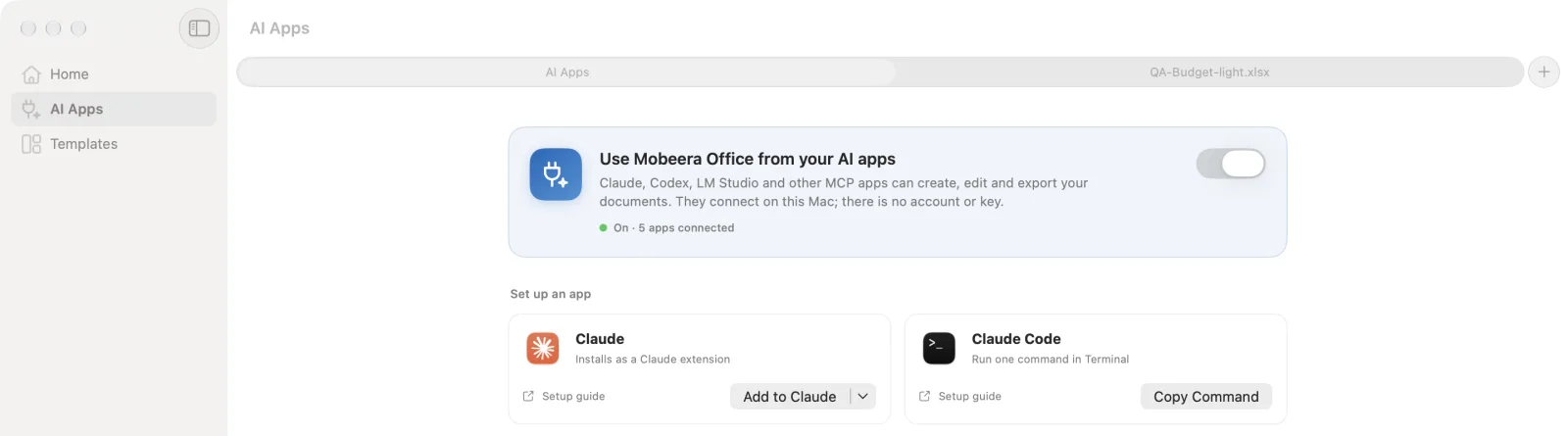
Install Mobeera Office on your Mac, open AI Apps and turn on Use Mobeera Office from your AI apps. For the Claude desktop app, click Add to Claude and install the extension Claude shows. For Claude Code, click Copy Command and run it in Terminal. Claude can then create, read, edit and export real .docx, .xlsx, .pptx and PDF files, with edits you can track and undo.
Claude can work on real Office files on your Mac when it is connected to an office suite through MCP. Mobeera Office includes an MCP server and a one-click Claude extension, so Claude creates and edits the .docx, .xlsx, .pptx and PDF files themselves, and you watch the result open in a full editor.
This guide covers both the Claude desktop app and Claude Code.
What you need
- A Mac with Apple silicon and macOS 14 or later.
- Mobeera Office from the Mac App Store.
- The Claude desktop app, or Claude Code.
Turn on AI Apps in Mobeera Office
- Open Mobeera Office and choose AI Apps in the Home window's sidebar.
- Turn on Use Mobeera Office from your AI apps.
There is no account to create and no key to copy. The connection stays on your Mac.
Add Mobeera Office to the Claude desktop app
- On the AI Apps screen, find the Claude card. It says Installs as a Claude extension.
- Click Add to Claude.
- Claude opens and shows the Mobeera Office extension. Confirm the installation in Claude.
- If Claude was already open, quit and reopen it.
If Claude is not installed, the button reads Get Claude. The card's menu also has Save Extension… if you would rather save the extension file and open it in Claude yourself. Claude's own guide to local MCP servers explains how extensions are managed in Claude's settings.
Add Mobeera Office to Claude Code
- On the AI Apps screen, find the Claude Code card.
- Click Copy Command.
- Paste the command into Terminal and run it.
The command has this shape, with the path to Mobeera Office filled in for your Mac:
claude mcp add --scope user mobeera-office -- <path to Mobeera Office> --mcp
Use the copied command and not a typed one, so the path is exact. The --scope user option makes Mobeera Office available in every project. Run claude mcp list to confirm that mobeera-office is there. See the Claude Code MCP documentation for managing servers.
Try it
Ask Claude for something you can check quickly:
Using Mobeera Office, create a budget workbook for a three-month marketing campaign with a monthly breakdown, totals and a chart.
Then a document edit:
Open ~/Documents/services-agreement.docx in Mobeera Office with tracked changes on. Flag any dates that conflict and suggest clearer wording for the payment terms.
And a job across formats:
Take the figures in q3-results.xlsx, build a five-slide summary deck in Mobeera Office and export it as a PDF.
The first time Claude opens a file in a folder, macOS may ask you to grant Mobeera Office access. Before Claude can export, choose a folder under Save exports to on the AI Apps screen.
Review what Claude changed
- In Docs, Claude's edits can arrive as tracked changes under Claude's name. Accept or reject each one.
- The Activity list on the AI Apps screen shows what Claude created, changed and exported, with Undo for the latest change in a document.
- To approve each file Claude opens or saves, turn on Ask me before an app opens or saves a file.
Claude works on files you share with it and files it creates. Anthropic processes the content Claude reads under its own terms. Check Claude's work before you rely on it, especially figures and dates.
Common questions
Does this use my Claude plan or an API key?
Your Claude plan. Mobeera Office adds tools to Claude; it does not bill you for AI. An API key is only needed for AI Chat inside Mobeera Office.
Is it free?
Mobeera Office is free to download, and Claude can read, render and export files on the free plan. Creating files from Claude, and editing beyond the first two pages, the first two slides or the first 50 rows, needs Mobeera Office Pro, a one-time purchase. See pricing.
Can Claude on iPhone or on the web use it?
No. The connection runs on your Mac, between Mobeera Office and the Claude desktop app or Claude Code.
What else can connect?
ChatGPT with Codex, LM Studio, Cursor and other apps that run local MCP servers. See the general setup guide.
Claude is a trademark of Anthropic, PBC. Mobeera is not affiliated with Anthropic.