How to open and edit Excel files on Windows without Excel
Four ways to open and edit an XLSX file on a Windows PC without Microsoft Excel or a Microsoft 365 subscription, and how to send back a working Excel file.
Direct answer
How do I open and edit an Excel file on Windows without Microsoft Excel?
Open the XLSX file in another spreadsheet app. Excel for the web is free with a Microsoft account and keeps the file in OneDrive. Google Sheets edits Excel files in a browser. LibreOffice Calc is a free desktop app that saves Excel format if you choose it. Mobeera Office opens and saves XLSX directly on your PC: choose Open File on its Home screen, edit, then press Ctrl+S. Reopen the saved file and check the totals before sending it.
You do not need Microsoft Excel, or a Microsoft 365 subscription, to work on an Excel file on a Windows PC. An .xlsx workbook opens in several apps. What differs is where the file lives and whether the app keeps the Excel format.
Which Windows apps open Excel files?
| App | Cost | How it handles XLSX |
|---|---|---|
| Excel for the web | Free with a Microsoft account | Edits XLSX in a browser; files live in OneDrive |
| Google Sheets | Free with a Google Account | Edits XLSX in a browser; files live in Google Drive |
| LibreOffice Calc | Free | Desktop app; choose Excel format when saving |
| Mobeera Office | Free to try; yearly or one-time purchase | Desktop app; opens and saves XLSX directly |
Excel for the web
Sign in at office.com, upload the workbook to OneDrive and edit it in the browser. It has fewer features than desktop Excel and needs an internet connection.
Google Sheets
Upload the file to Google Drive and open it. Sheets can edit the Excel file itself, without macros, and is the best choice when several people edit at once.
LibreOffice Calc
LibreOffice is a free, open-source desktop suite, and Calc works much like Excel. Its own format is .ods, so keep Excel format when it asks on saving.
Mobeera Office
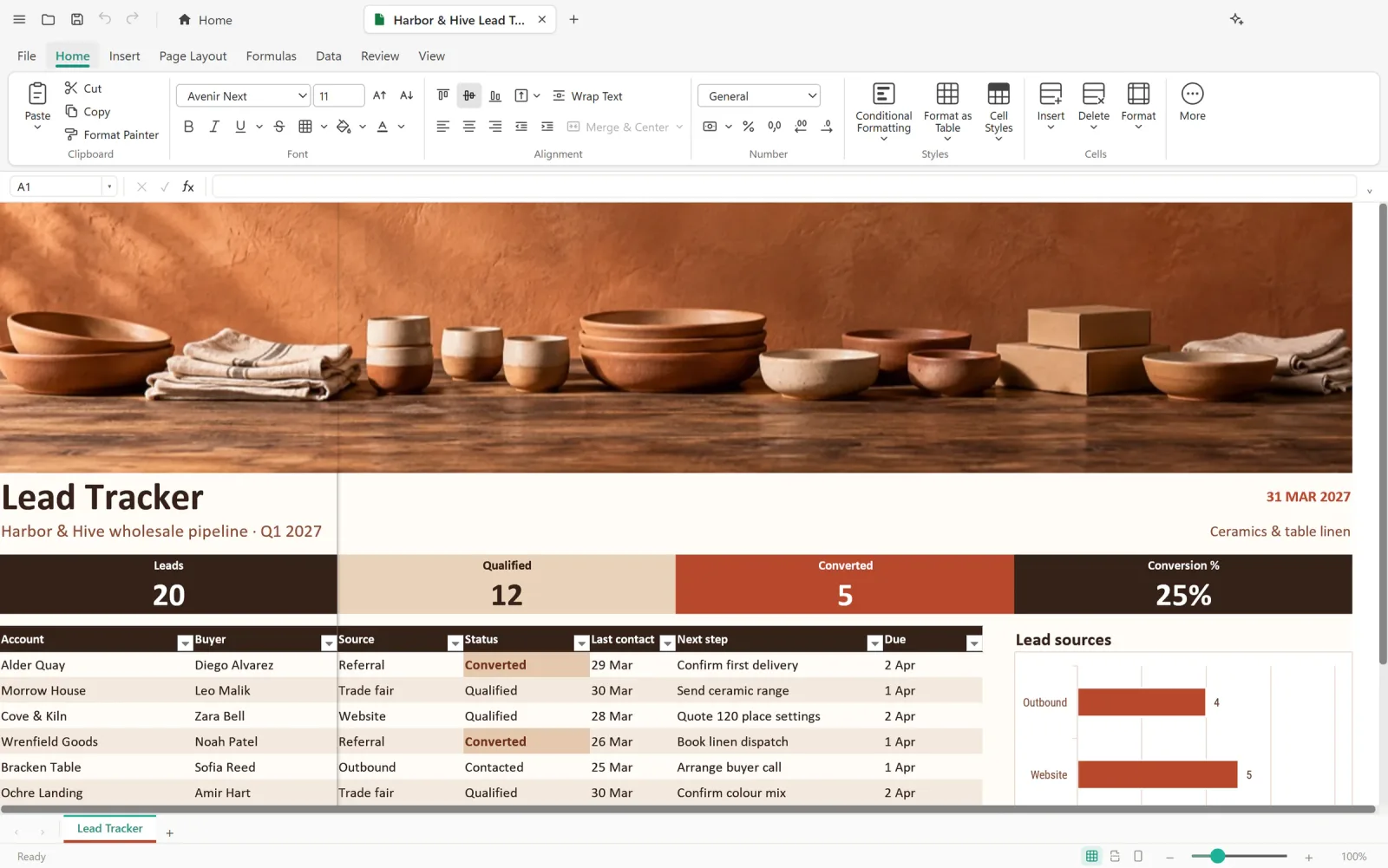
Mobeera Office edits the .xlsx file itself on your PC, with the tabs Excel users expect: Home, Insert, Page Layout, Formulas, Data, Review and View. It is the one used in the steps below.
Mobeera Office for Windows is in the Microsoft Store. It runs on Windows 10 and Windows 11 on a 64-bit Intel or AMD PC.
1. Open the workbook
Keep the original: copy the file in File Explorer first and work on the copy.
- Start Mobeera Office.
- On the Home screen, click Open File…, or press Ctrl+O.
- Pick the
.xlsxfile..xlsm,.csvand.tsvfiles open too.
The free plan edits rows 1 to 50 of the first sheet; the rest opens for reading. A yearly plan or lifetime access removes the limit.
2. Edit cells and formulas
Click a cell and type to replace it, or double-click to edit what is there. Formulas are written as in Excel, starting with =, and the Formulas tab lists functions by kind.
Click a cell before you overwrite it. If the formula bar shows something starting with =, typing a number replaces the calculation.
3. Sort, filter and chart
- Data has sorting and filters. Click inside the table first so rows stay together.
- Insert adds a chart from the selected range, plus tables and pictures.
- Home has Conditional Formatting, Format as Table and Cell Styles.
- Page Layout sets margins, orientation and the print area.
4. Save as Excel
Press Ctrl+S, or open the File tab and choose Save. The file stays an .xlsx workbook. Save As… (Ctrl+Shift+S) saves under a new name, or as a CSV file.
For a PDF copy, click the Menu button at the top left of the window and choose File → Export as PDF….
5. Check before you send
Close the workbook and open the saved file again, then check:
- the totals match what you expect;
- no cell shows an error such as
#REF!or#NAME?; - every sheet is still there, with its name;
- charts still show the right data.
Common questions
Can I open an Excel file on Windows for free?
Yes. Excel for the web, Google Sheets and LibreOffice Calc are free. Mobeera Office opens any workbook for reading and edits rows 1 to 50 of the first sheet free.
Can I open an old .xls file?
Not in Mobeera Office, which works with .xlsx. Open the .xls file in LibreOffice Calc or Excel for the web and save it as .xlsx first.
Do macros work?
No. Macros written for Excel need Excel. A macro-enabled .xlsm workbook still opens, with its data and formulas, and is saved in the same format.
Can I work offline?
LibreOffice and Mobeera Office are desktop apps and work without a connection. Excel for the web and Google Sheets need one.