How to edit a .pub file without Microsoft Publisher
Edit a Publisher .pub file after Publisher's retirement: open it in Mobeera Office, check fonts and linked text boxes, change the content, then print or export a PDF.
Direct answer
How do I edit a .pub file without Microsoft Publisher?
Open the .pub file in Mobeera Office on Mac, Windows, iPhone, iPad or Android. It becomes an editable publication with your text boxes, tables, pictures and master pages. Run Design Checker on the Review tab to find missing fonts and text that no longer fits, make your changes, and save. The work is saved as a .mpub file; print it or choose Export as PDF to share it.
You can keep editing a Publisher file after Publisher's retirement. The work moves to a new app, and the first edit takes a little longer because you check that everything arrived. After that, the weekly bulletin or the term newsletter is a normal job again.
This guide uses the Publish editor in Mobeera Office on Mac. The same steps work on Windows, iPhone, iPad and Android.
What are my options for editing a .pub file?
| Way | What you get | Good for |
|---|---|---|
| Mobeera Office | An editable page layout with linked text boxes, master pages, mail merge and booklet printing | Publications you update again and again |
| LibreOffice Draw | An editable drawing, for files from Publisher 98 to 2010 | A one-off change to an older file |
| Affinity | A professional design document | Design teams |
| PDF opened in Word | A Word document rebuilt from a PDF | Getting the text out |
Before you start
- Keep the original
.pub. Mobeera Office never changes it; it makes a new publication beside it. - If you have a PDF or a printed copy of the publication, keep it at hand to compare.
- Editing needs lifetime access. On the free plan a publication opens for reading, so you can check how a file looks before you buy.
1. Open the file
In Finder, right-click the .pub file, choose Open With and pick Mobeera Office. The file opens as a new publication with the same name, saved in My Files as .mpub.
If part of the file could not be carried over exactly, a notice says so after opening. Typical notices are WordArt kept as a picture, a shadow style that could not be reproduced, or an embedded font that could not be read.
2. Check what arrived
Go through the pages once before you change anything.
- Open the Review tab and choose Design Checker. It lists missing fonts, text that does not fit its box, empty picture frames, low-resolution pictures and objects past the page edge.
- For a missing font, install the font on your device or pick a replacement and adjust the text boxes.
- Open View → Master Page to see headers, footers and page numbers that repeat on every page.
- Click a long article and check that it still flows into the next box. The Text Box Format tab shows Previous and Next for linked boxes.
3. Make your changes
The tabs follow the layout Publisher users know.
- Home has fonts, paragraph settings, styles and Arrange.
- Insert adds pages, tables, pictures, shapes, text boxes, WordArt, calendars, page numbers, headers and footers.
- Page Design has Margins, Orientation, Size, Guides, color Schemes, Background and Master Pages.
- Text Box Format has Text Fit, Hyphenation, Columns, and Create Link and Break for text that continues in another box.
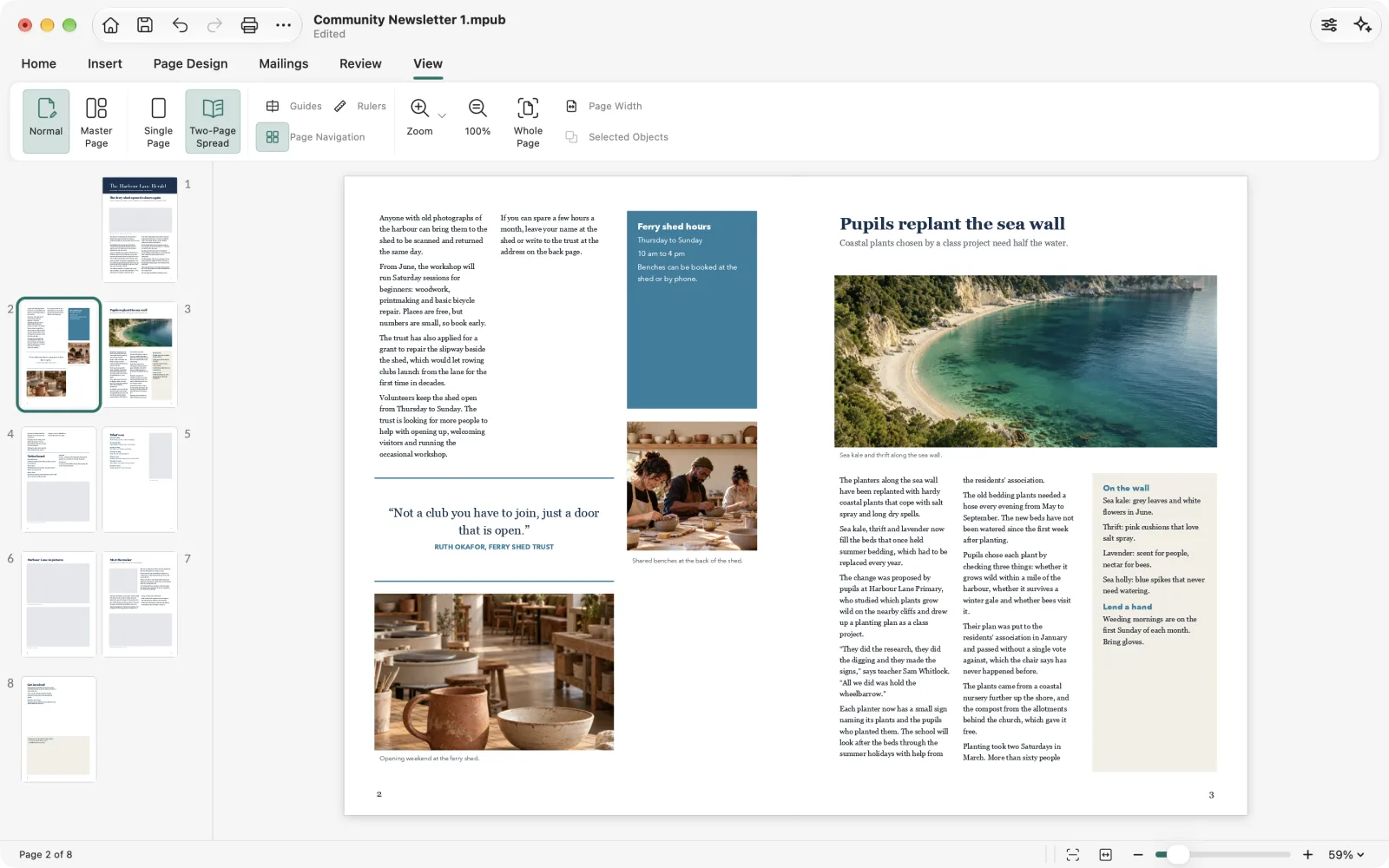
For next week's bulletin, the usual routine is: duplicate last week's publication, replace the text and pictures, and run Design Checker again.
4. Save
Choose File → Save. On iPhone and iPad, changes save automatically. Your work is stored as a .mpub publication. Mobeera Office does not write .pub files, and neither does any other app now that Publisher is retired.
5. Print or share
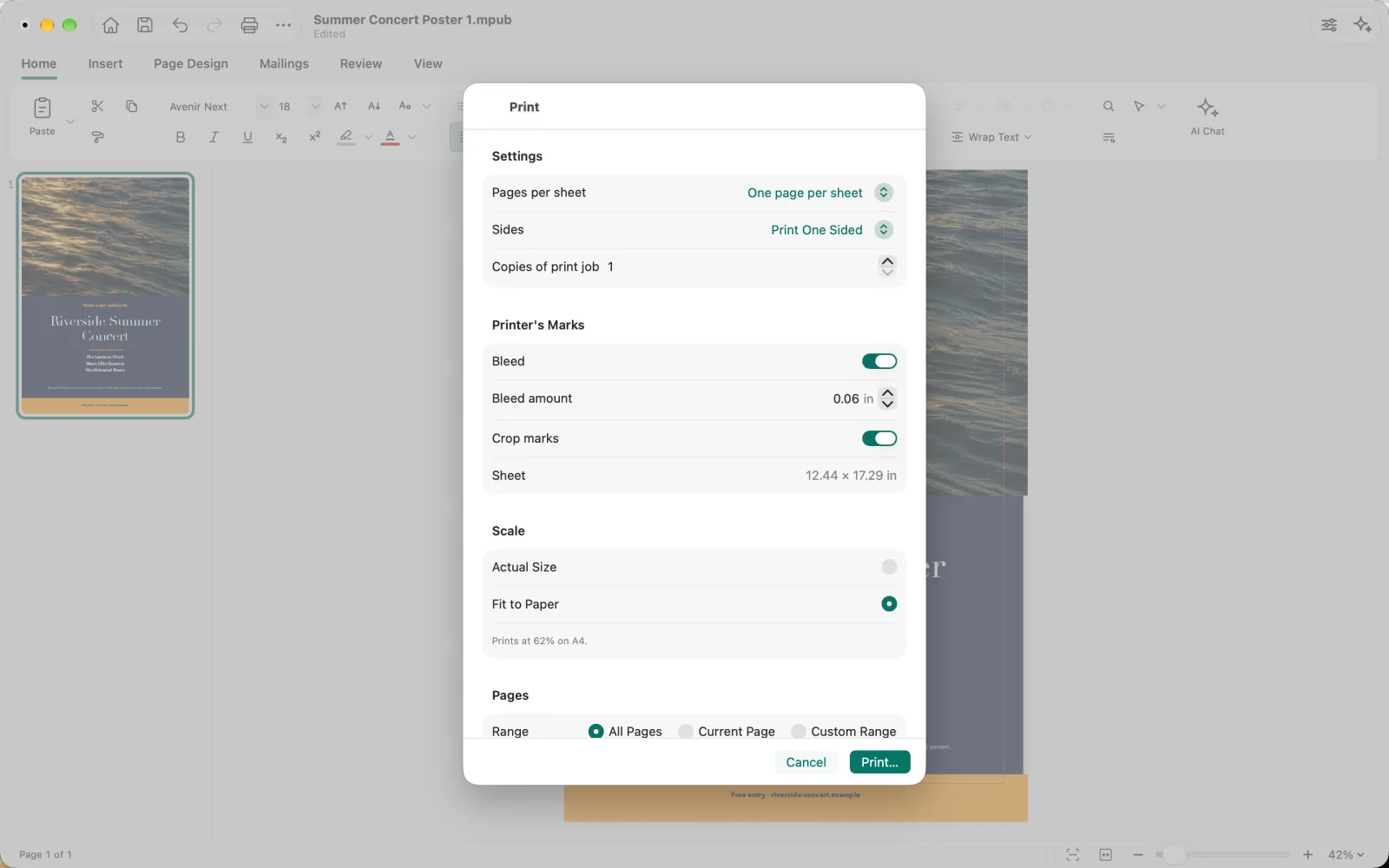
- File → Print… offers one page per sheet, several per sheet, Booklet, side-fold, folded cards and tiled posters, printing on both sides, and Bleed and Crop marks for a print shop.
- File → Export as PDF… makes a copy anyone can open. Presets run from Minimum Size to Commercial Press.
- Export Pages as Pictures… saves pages as PNG or JPEG for a website or social post.
Common questions
Can I edit a .pub file for free?
LibreOffice Draw is free and edits files from Publisher 98 to 2010 as drawings. Mobeera Office opens publications for reading on the free plan; editing needs lifetime access.
Will mail merge from my old file still work?
Set it up again. Open the Mailings tab, choose Select Recipients, then add merge fields with Insert Merge Field. Finish & Merge prints or makes a PDF.
Can several people edit the same publication?
Yes, if each has Mobeera Office. Share the .mpub file the way you shared the .pub.
Can I go back to Publisher later?
Your original .pub is untouched, so anyone with a working copy of Publisher can still open it. Changes you make in Mobeera Office stay in the .mpub file.